








|
|
|
|
|
|
|
|
|
|
|
|
|
|
||||||||||
|
|
|
|||||||||
|
|
|
|
|
|
|
|
|
|
|
|
|
|
|
|||||||||
Computers
 |
The thing that frustrates Lynn the most about my computers is the fact that most of my hobbies, and a lot of the necessities of family life (like budgets and finances), have segments that have weaseled their way onto my home computer . She never knows whether I am working or playing when I'm hunched over the keyboard in my office (which is often).
I cut my programming teeth on FORTRAN II in the 60s & 70s (in high school and college), Macro-Assembler programming for PDP-11/34 mini-computers in the early 80s, and have worked my way up through 8086 Assembler and Pascal to C and C++, and now do recreational programming in Microsoft's Visual Basic and Access. Never bothered with (and have no interest in) Macintosh computers. When things go wrong (as they always do), you have very few options to do anything about it with a Mac. With Windows-based machines, you can treat them like toasters (which is what a Mac proudly compares itself to), or you can use it as a Swiss Army Knife, but at least with a PC you have the choice. And they're a heck of a lot cheaper than Macs too!
I've had a few computers over the years, some better than others. I tend to keep a machine for 4-6 years or more. I’ve found that I need to either refresh or upgrade the operating system about every 2 years, and when refreshing the machine or upgrading to a major new version of an operating system, buying a new boot drive and installing a clean copy of the OS onto a new hard drive is the least painful and most successful, rather than trying to upgrade an existing install which may be 3 or 4 years old, or more. Three or four years of heavy use takes its toll on an instance of an operating system; applications being installed and uninstalled, old hardware and accessories and the resultant drivers being replaced with new ones, all take their toll on the speed and efficiency of an installed operating system. For Windows, the victim is often the registry; The Windows Registry is an internal hierarchical database that stores configuration settings and options for the operating system, peripherals, applications, and other various and sundry things. The bigger it is, the slower it performs and the more likely something will get corrupted. After 3-4 years of active use it can get HUGE! So I prefer to start from scratch. It also forces me to think long and hard about the applications I want to re-install, so that also helps clean house in its own way.
Installing the OS on a new hard drive also permits me to bump the old boot drive up to drive D, which gives me access to all my old data files. Of course, the old OS still takes up space on the formerly bootable drive, but I can delete the OS files at my leisure after I’m sure I don’t need to go back to the old environment for any reason.
My computers over the years have run the gamut as far as brands and capabilities:
Other computers lying about the house include:
 The OLPC project is a philanthropic effort who's aim is to provide each child in developing countries with a rugged, low-cost, low-power, connected laptop. The OLPC project believes that as the pace of change in the world increases dramatically, the urgency to prepare all children to be full citizens of the emerging world also increases dramatically.
They believe that no one can predict the world our children will inherit and that the best preparation for children is to develop the passion for learning and the ability to learn how to learn.
They believe that the root cause of the rapid change, digital technology, also provides a solution. When every child has a connected laptop, they have in their hands the key to full development and participation. Limits are erased as they can learn to work with others around the world, to access high-quality, modern materials, to engage their passions and develop their expertise. What children lack is not capability, it is opportunity and resources.
The OLPC laptop was designed collaboratively by experts from academia and industry to combine innovations in technology and learning. They considered the need to weather extreme environmental conditions such as high heat and humidity, to support easy field repair by children, and local language support. As a result, the laptop is durable, functional, energy-efficient, responsive, and fun. It runs a varient of Linux designed specifically for it, called "Sugar." It has a water-resistent keyboard and case, wi-fi, USB and SD card support, built-in camera and microphone, and a color screen that is viewable in direct sunlight.
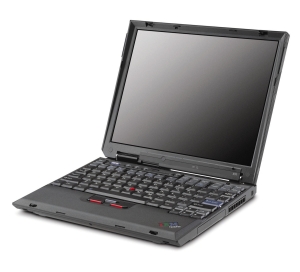 I owned some other older laptops over the years, starting with a Gateway Liberty (486 DX4/100 processor w/ 24MB memory), one of the first laptops on the commercial market, bought for me by my then-employer when I worked in Germany. I also had an early IBM ThinkPad X31 notebook (1.7 GHz Intel Pentium M processor, 1GB memory, 40 GB hard drive, wireless connectivity, and and an X3 UltraBase docking station that contains a combination CD-RW and DVD drive) and a ThinkPad X32 (2.0 GHZ Intel Pentium M Centrino processor, 1 GB memory, 60 GB hard drive wireless, and another X3 Ultrabase dock) bought at the MITRE employee auction in 2007 & 2008. This replaced an HP Omnibook 4150 notebook computer I also bought at MITRE auction more than a few years back, and finally donated to the Woburn Historical Society for use during their monthly presentations.
Lynn's first computer was a PowerSpec 6655 with a 2.66 GHz Dual-core Pentium-D 805, 1 GB PC4200 DDR2 RAM, 250 GB PATA drive, a Samsung 17 inch LCD monitor, and a Canon Pixma MP160 All-In-One photo printer-scanner-copier (which she still uses, mostly to copy quilt patterns). She had this on a computer cart in her sewing room for about a year, but she obtained an auction-acquired Dell D810 laptop as her machine for a while, and this PowerSpec 6655 was the house server at the TreeHouse up until August 2019, providing backup storage for various machines and a customized internal web site with links to family information and local data sites.
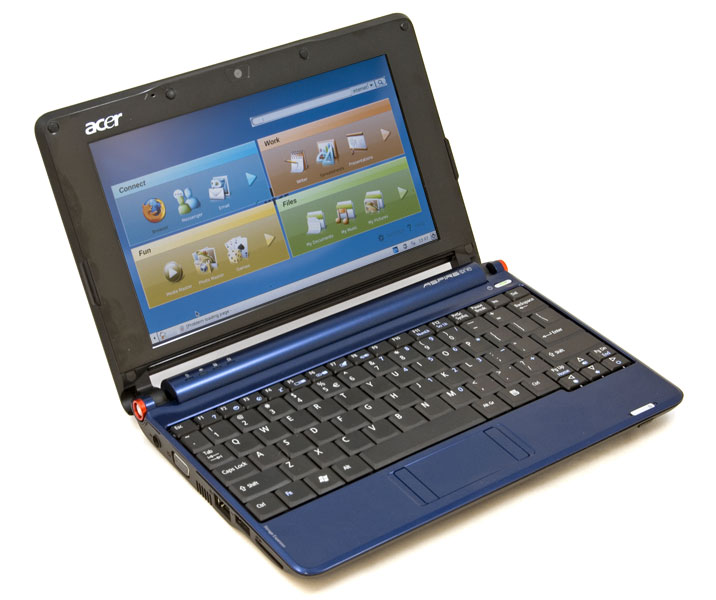 Her second computer was a cute little 2-pound Acer Aspire One 10.5" Netbook, with a 1.6 GHz Intel Aton N270 processor, 250 GB hard drive, and Windows 7, but now she has a Lenovo Yoga 13, a dual-mode convertible touch-screen laptop/tablet running Windows 10. These days she uses her Android phone as her computer of choice for email and searching and surfing, but is thinking about going back to at least having access to something with a real keyboard.
In my former basement office in the Family TreeHouse where the network hub was, I ran my main workstation (#8), a sandbox machine for testing stuff that might wipe something out or damage the hardware, the Powerspec 6655 house server (managing webcams and streaming audio), and occasionally my work-owned triennial¹ Dell Latitude laptop, all off a Belkin FIDZ104T 4-port KVM (keyboard-video-mouse) switch that let me share my monitor, a Logitech trackball, and a generic keyboard among up to four machines. It saved desk-space, and was very convenient.
In my current 2nd-floor office in the BallotBox, I have my main workstation (#12), the house server (#11), my current laptop (#9x), two Raspberry Pi CPUs, and two NetGear ProSafe GS108 network switches fed by a CAT6 shielded riser cable² direct from the Time-Warner Spectrum 100Mbps cable modem in the basement.
INFRASTRUCTURE
The infrastructure supporting all this is a bit more elaborate than most home installations...
Even the old TreeHouse infrastructure also had a bit of chutzpah to it. I installed CAT5 Ethernet cable throughout the house, all terminating at a home-grown distribution panel. I ran nine drops at the TreeHouse. In most of those places I also ran broadband cable TV and phone lines, with all three cables (network, cable TV, POTS phone) terminating in a single junction box with a triple-socket cover-plate holding one connector for each type of cable. I bought all my cable, connectors and stuff from You-Do-It Electronics in Needham MA, a great place to shop - pure heaven for D-I-Y techno-nerds!! All the drops collected in one spot where the distribution panel was, and the panel was fed by my Comcast-supplied cable modem that gave us unbelievable, stupendous, incredible, high-speed (at the time) 24-hour access to the internet.
Connected to the cable modem was a LinkSys WRT1900AC 4-port dual-band wireless router that allowed me to share the cable-modem connection with all the computers in the house. Naturally, I had encryption enabled on the wireless portion of the router.
Also connected to the cable modem was a Netgear GS116 16-port switch/hub that allowed me to connect up to sixteen network feeds to the cable modem simultaneously.
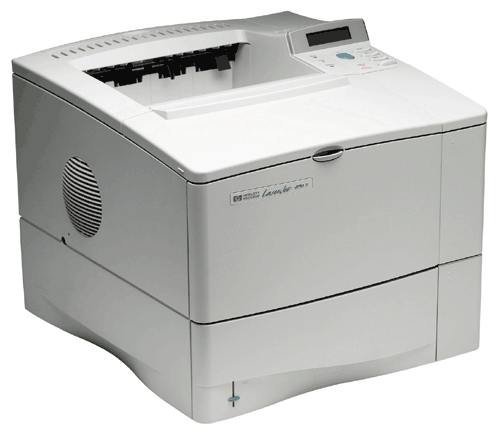 Sitting on the network and accessible to all house network computers (permanent or visiting) was an HP 4050N LaserJet Network printer I bought at MITRE auction for $51. It was hardly used at all in its previous life at MITRE after 5 years of ownership (~1100 pages printed, original toner cartridge was 7/8th full). I had a dickens of a time figuring out how to reset the IP address for the ethernet network connection, but once I did it was trivial to get any and all computers printing to it.
For the ten years that the BallotBox was our second house up in Maine, I mimicked the IT infrastructure up there, where we were attached to Time-Warner broadband cable. Initial connection was the "Standard" service, 12.5 Mbps downstream, 0.5 kbps upstream, now up to 100Mbps since the house is our permanent residence now. There was a house server (the no-name Pentium 4) running Windows Server 2003 and hosting an internal web site with local information, anotherLinkSys WRT1900AC 4-port dual-band wireless router connected to the cable modem, another MITRE-auction-acquired HP 4050N LaserJet Network printer, and everything was configured to match the setup at the TreeHouse down south, so we fired up our laptops up up there, and the wireless SSID and access code was the same, the printer network address was the same, the local house web site address was the same. Worked like a champ! We also had (and still have) a few Foscam webcams pointing out onto the front lawn and the deck so we can keep track of comings and goings!
Now that the BallotBox is our one-and-only home, we've bumped up the robustness a bit, rewickering the network into a more organized cabinet rather than a mishmash of items on shelves lashed together with CAT-5 cable. All the networking parts from down south came north and are available as spares or replacements, and a few "features" were intentionally designed in to the construction process, like the empty PVC conduit², and a similar PVC conduit running from the wall in the livingroom where the TV and stereo lives down into the basement, to easily run the four zones of audio cable out to the designated areas (living room, sunroom, front outdoor patio, back outdoor deck). Just trying to think ahead...
[Sept. 2020 update] After almost a year of enduring a puzzling drop in network capacity, I finally isolated the source of the problem. I use Ookla's "SpeedTest" to document the network performance at the BallotBox and the previous TreeHouse (and hotels and motels when we travel), and there was a ten-fold DROP in download speed at the end of December 2019:
DATE |
PING |
DOWN (Mbps) |
UP (Mbps) |
| September 17, 2019 | 20 |
117.82 |
11.69 |
| September 18, 2019 | 20 |
82.39 |
26.49 |
| December 4, 2019 | 19 |
118.50 |
20.06 |
| December 31, 2019 | 20 |
12.01 |
11.35 |
| February 27, 2020 | 25 |
11.82 |
11.74 |
| March 10, 2020 | 124 |
10.82 |
3.37 |
| April 27, 2020 | 16 |
10.18 |
3.60 |
| July 12, 2020 | 19 |
10.65 |
11.16 |
At first I suspected a problem with the connections on the new house network wiring (see whole-house network schematic diagram here). I had run plenum-rated CAT-6 "Riser" cable between floors and out to the garage, and I was suspecting the CAT-6 to CAT-5 intercouplers might be defective. My network tester showed no problems.
So I started walking backwards along the signal path... it wasn't the house cable, so I removed the Netgear GS116 16-port 10/100/1000 Gbps hub and plugged directly into the LinkSys WRT 1900AC router. No change, so I removed the WRT 1900AC and plugged directly into the Arris CM802A Cable Modem. BINGO!
It turned out to be a problem with the old Linksys WRT 1900AC whole-house router! I had a "spare" 1900AC (from the MA house) but that didn't fix it, so I tried to replace the Linksys firmware with the DD-WRT open source firmware, but that wasn't working either, so I punted and replaced the 12-year-old 1900AC with a Synology RT2600ac router (top scores in a number of router shoot-outs). Problem solved!
DATE |
PING |
DOWN (Mbps) |
UP (Mbps) |
| September 15, 2020 | 22 |
117.87 |
11.72 |
| September 16, 2020 | 18 |
118.17 |
11.60 |
| September 17, 2020 | 21 |
118.33 |
11.75 |
| September 18, 2020 | 18 |
118.15 |
10.46 |
| September 22, 2020 | 19 |
118.04 |
09.47 |
Happy Computing! And remember: There are 10 kinds of people in the world, those who understand binary, and those who don't!
¹ triennial - "recurring every three years" ... my employer issued laptops to every engineer, and replaced them every three years. Older laptops were auctioned off to employees (sans hard drives for security reasons) which was the source of my endless supply of used laptops. Auctions were held 3 times a year, and employees could bid on - and win - up to three laptops per auction. I bought a lot of used laptops over the years for family and friends!
² riser cable - During renovation of the Ballot Box I had the electrician run a continuous empty 1½-inch PVC conduit from the basement up to my office on the 2nd floor so allow me to pull a shielded CAT-6 trunk riser cable from the cable modem in the basement to my workstation on the 2nd floor.
Copyright © 1973-2024 by Eugene F. Vogt. All rights reserved. Last modified 28-Jun-2024 8:01 AM ET. Send questions or comments to the Family TreeHouse WebMeister. View our Privacy Policy.